Stay curious.
Stay in the know.
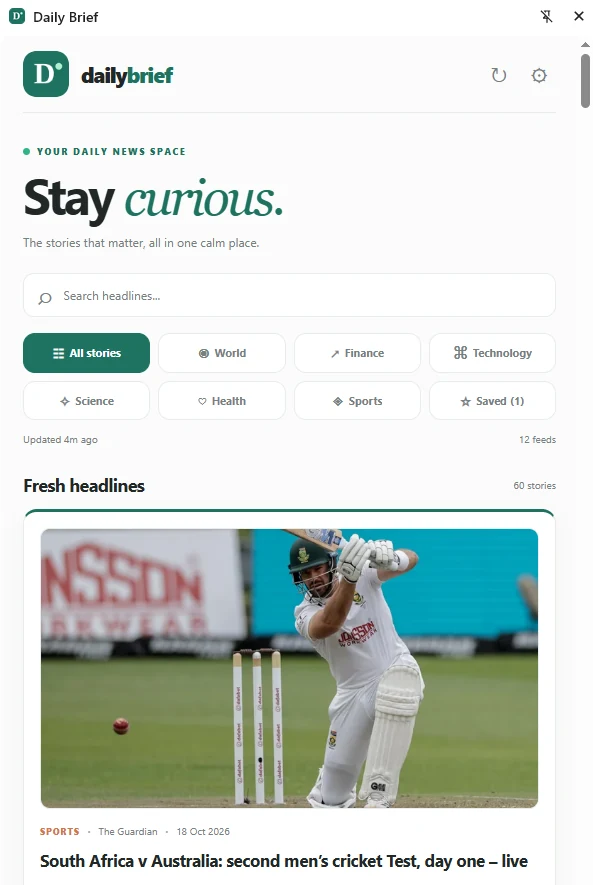
The stories that matter, all in one calm place. Daily Brief brings trusted RSS headlines, beautiful article previews, and your saved reads into Chrome’s side panel — without the noise.
Free to use · No account · Version 0.2.0 · Chrome 114+
Download the ZIP, extract it, and use “Load unpacked” at chrome://extensions.
Less noise. More meaning.
Everything you need to stay informed, thoughtfully organized in a beautifully simple reading experience.
Six topics. One view.
Explore World, Finance, Technology, Science, Health and Sports from a clean, always-visible category grid.
Stories with context.
See headlines, relevant RSS images and publisher summaries before opening the full article at its original source.
Your reading list.
Bookmark interesting articles and return to them whenever you have time.
Find what interests you.
Search across your news stories and filter them by topic in just a click.
Ready when you are.
Refresh feeds at your preferred interval while the panel is open, and revisit previously cached headlines offline.
Make it yours.
Choose your favorite RSS publishers, add custom HTTPS feeds and switch between light or dark reading modes.
Make the news your own.
A simple browser companion, ready in minutes.
Install Daily Brief
Download the extension, extract the ZIP, then load the folder in Chrome’s extensions page with Developer mode enabled.
Choose your sources
Select the categories and publishers you want, or add any custom HTTPS RSS feed you follow.
Read at your pace
Open the side panel, browse fresh headlines and save articles for a quieter moment later.
Questions, answered.
Is Daily Brief free?
Yes. The current version is free and does not require an account or a paid API subscription.
Does Daily Brief show full news articles?
It displays the excerpt supplied by the RSS publisher and opens the original article for full reading. Not all feeds provide images or detailed excerpts.
Can I add other news sites?
Yes. You can add HTTPS RSS or Atom feed URLs. Chrome will ask for permission to access each custom publisher when you add it.
Does it work without internet?
Previously cached headlines and bookmarks remain available, but loading new news and opening publisher websites requires an internet connection.
How do I install the ZIP?
Extract the ZIP, open chrome://extensions in desktop Chrome, enable Developer mode, click Load unpacked and select the folder containing manifest.json. Then click the Daily Brief extension icon to open its side panel.